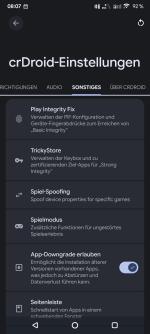

crDroid 12.9 (Unofficial)
General
I compiled crDroid for the SHIFTphone 8!Prerequisites
- unlocked bootloader
Download
OTA ZIP: https://drive.google.com/file/d/1y0gwSSORGadyGVrVlH-ciIl1rzLSoGU-/view?usp=sharingFastboot Variant: https://drive.google.com/file/d/1dQERtm_QScwk7_2EoUhs5ANk9sSKYk_z/view?usp=sharing (Version 12.7, only for first install)
Install
For the first installation, download the Fastboot Variant, extract it and run the commands in the _flash.bat file while the device is attached in bootloader mode.Update
Just flash the OTA ZIP and wipe cache (reboot into recovery again after each flash)Source
- Device Tree - https://github.com/LineageOS/android_device_shift_otter/tree/lineage-23.2
- Kernel - https://github.com/LineageOS/android_kernel_shift_qcm6490/tree/lineage-23.2
- Blobs - https://github.com/TheMuppets/proprietary_vendor_shift_otter/tree/lineage-23.2
- Manifest - https://github.com/crdroidandroid/android/tree/16.0
Building
To compile it yourself you just have to follow these simple steps (and need a beefy PC)
- install Ubuntu (you can use Windows On Linux 2)
- execute the following commands
- install programs
Code:sudo apt install repo bc bison build-essential ccache curl flex g++-multilib gcc-multilib git git-lfs gnupg gperf imagemagick lib32ncurses-dev lib32readline-dev lib32z1-dev liblz4-tool libncurses6 libncurses-dev libsdl1.2-dev libssl-dev libwxgtk3.2-dev libxml2 libxml2-utils lzop pngcrush rsync schedtool squashfs-tools xsltproc zip zlib1g-dev -y - configure git
Code:git config --global user.email "you@example.com" git config --global user.name "Your Name" git lfs install git config --global trailer.changeid.key "Change-Id" - configure ccache
Code:rm ~/.cache/ccache mkdir -p ~/.cache/ccache/tmp echo export USE_CCACHE=1 >> ~/.bashrc echo export CCACHE_EXEC=/usr/bin/ccache >> ~/.bashrc echo export CPU_SSE42=false >> ~/.bashrc ccache -M 50G - configure working directory (note that mine residents in the folder /home/android/shift8, change accordingly)
Code:mkdir -p /home/android/shift8/crdroid cd /home/android/shift8/crdroid repo init -u https://github.com/crdroidandroid/android.git -b 16.0 --git-lfs --no-clone-bundle mkdir -p /home/android/shift8/crdroid/.repo/local_manifests cat <<EOF >>/home/android/shift8/crdroid/.repo/local_manifests/otter.xml <?xml version="1.0" encoding="UTF-8"?> <manifest> <project path="device/shift/otter" remote="github" name="LineageOS/android_device_shift_otter" revision="lineage-23.2" /> <project path="kernel/shift/qcm6490" remote="github" name="LineageOS/android_kernel_shift_qcm6490" revision="lineage-23.2" /> <project path="vendor/shift/otter" remote="github" name="TheMuppets/proprietary_vendor_shift_otter" revision="lineage-23.2" /> </manifest> EOF repo sync --current-branch -j8 --force-sync --force-checkout --force-remove-dirty --prune --auto-gc - optional - increase SWAP size (to 80GB) to prevent out of memory crashes
Code:sudo -s swapoff -a rm /swapfile fallocate -l 80G /swapfile chmod 600 /swapfile mkswap /swapfile swapon /swapfile
- install programs
- build! (and fix the incorrect ARCH_VARIANT before it)
Code:git -C ./device/shift/otter reset --hard HEAD git -C ./device/shift/otter clean -d --force sed -i 's/TARGET_2ND_ARCH_VARIANT := armv8-a/TARGET_2ND_ARCH_VARIANT := armv8-2a/' "./device/shift/otter/BoardConfig.mk" source build/envsetup.sh brunch otter
Zuletzt bearbeitet:


 (nicht ganz ernst nehmen).

 wenn Shift doch mal auf LOS Basis wechseln sollte, vielleicht ist damm auch mehr möglich