Du verwendest einen veralteten Browser. Es ist möglich, dass diese oder andere Websites nicht korrekt angezeigt werden. Du solltest ein Upgrade durchführen oder einen alternativen Browser verwenden.
Tap-to-wake hatte ich vorher nicht. Geht jetzt
Sporadisch Kein Ton nach BT-Verbindung hatte ich seit 6.7G, ist jetzt hoffentlich gefixt.
Sporadisch kein AkkuLaden trotz Anzeige hatte ich seit 6.7G, ist jetzt hoffentlich gefixt.
Bisher keine Probleme.
(Hab allerdings manchmal das Gefühl (?), dass die Darstellung im Display vorher flüssiger war, obwohl vorher wie auch jetzt nur 60 Hz eingestellt.)
Hallo zusammen,
Gibt es schon ein OTA Update? Bei mir kommt immer eine Fehlermeldung, dass ich meine Internetverbindung checken soll.
Manuelle Installation klappt auch nicht... Bin wahrscheinlich zu blöd dafür. Hab die Datei schon runtergeladen. Dann geht der "Downloadordner" auf. Ich kann zwar die Datei auswählen aber nirgends starten oder ausführen oder sonst etwas damit machen.
" Die Installation erfolgt über die OTA App:
OTA Update Datei herunterladen und auf den internen Speicher des Gerätes ablegen
Einstellungen -> System -> Systemaktualisierung
Rechts oben drei Punkte -> Lokales Update
Die OTA Update Datei auswählen
ggf muss bei der Auswahl wieder rechts oben auf die drei Punkte gedrückt werden und "Int. Speicher anzeigen" ausgewählt werden.
Danach den Drawer öffnen (links oben die drei Striche und SHIFTphone 8 auswählen) und die zuvor heruntergeladene Datei auswählen.
Die Installation durchführen lassen (Gerät nicht neustarten!)"
Da steht auch noch mehr ... (zur manuellen Installation)
Screen mirroring geht bei mir immernoch nicht.
Kommt das noch?
Gibt es verschiedene, neuere Standards, die mein altes TV nicht versteht: liegt's also am Fernseher, nicht am Shiftphone ?
Gibt's ne App / Software, mit der ich Filme von meinen SP8 kabellos im WLAN in der Glotze gucken kann?
(Das Samsung S10 verstand sich gut mit dem Fernseher)(und ich hab das Screen mirroring gern genutzt.)
" Die Installation erfolgt über die OTA App:
OTA Update Datei herunterladen und auf den internen Speicher des Gerätes ablegen
Einstellungen -> System -> Systemaktualisierung
Rechts oben drei Punkte -> Lokales Update
Die OTA Update Datei auswählen
ggf muss bei der Auswahl wieder rechts oben auf die drei Punkte gedrückt werden und "Int. Speicher anzeigen" ausgewählt werden.
Danach den Drawer öffnen (links oben die drei Striche und SHIFTphone 8 auswählen) und die zuvor heruntergeladene Datei auswählen.
Die Installation durchführen lassen (Gerät nicht neustarten!)"
Da steht auch noch mehr ... (zur manuellen Installation)
Vielen Dank für das tolle Update!
Ich habe es mit heruntergeladener ZIP-Datei installiert (einfacher ging es kaum!), die in den Kommentaren vorgeschlagenen Änderungen in den Entwickleroptionen vorgenommen und muss sagen:
I'M HAPPY!
Danke, vorallem dafür, dass der Fingerabdrucksensor jetzt endlich direkt vom Sperrbildschirm aus funktioniert.
Fantastisch!
Jetzt muss ich mal blöd fragen, kommt die Aktualisierung auch noch ohne manuellen Download? Bis jetzt heißt es bei mir immer noch "Keine neuen Updates gefunden".
Jetzt muss ich mal blöd fragen, kommt die Aktualisierung auch noch ohne manuellen Download? Bis jetzt heißt es bei mir immer noch "Keine neuen Updates gefunden".
Wird es da Änderungen gegenüber der "Manuellen" Variante geben ?
Kann man auch trotzdem, wenn dem so sein sollte bei vorhandener manuell installierter Version OS 6.8G Variante die OTA Version "drüber" installieren ?
Wird es da Änderungen gegenüber der "Manuellen" Variante geben ?
Kann man auch trotzdem, wenn dem so sein sollte bei vorhandener manuell installierter Version OS 6.8G Variante die OTA Version "drüber" installieren ?
Hi @amartinz ich habe leider das selbe Phänomen dass das Display sich nach dem Sperren/Abschalten nicht mehr einschalten lässt. Ticket#554026829
Workaround habe ich angewendet. Ich hoffe ihr findet bald eine Lösung. Danke!
Hi @amartinz ich habe leider das selbe Phänomen dass das Display sich nach dem Sperren/Abschalten nicht mehr einschalten lässt. Ticket#554026829
Workaround habe ich angewendet. Ich hoffe ihr findet bald eine Lösung. Danke!
... erstmal ein großes Danke ans EntwicklerTeam für Update.
Ich hab das ZIP runtergeladen ... passiert bei mir immer auf die externe MicroSD und dann verschoben ins interne Download Verzeichnis. Irgendwie hatte ich da zwei Anläufe wei der direkte Download auf den internen und nachher das Verschieben auf den internen Speicher erst im 2. oder war es der 3. Anlauf klappte.
Leider nicht nachvollziehbar warum und wo ich da Mist gemacht habe ;-)
OTA lokal hat dann wunderbar geklappt und gefühlt ist alles etwas flüssiger geworden, hab aber nix an den Entwickleroptionen geändert.
Bin dann gespannt auf die nächsten Verbesserungen.
Hi @amartinz ich habe leider das selbe Phänomen dass das Display sich nach dem Sperren/Abschalten nicht mehr einschalten lässt. Ticket#554026829
Workaround habe ich angewendet. Ich hoffe ihr findet bald eine Lösung. Danke!
Habe auch keine Probleme.
Tap to wake funktioniert bisher fehlerfrei.
Keine Bluetooth Probleme.
Das OS ist jetzt schön stabil.
Wenn man doch nur die Benachrichtigungs-LED einstellen könnte ...
OTA Update Datei herunterladen und auf den internen Speicher des Gerätes ablegen
Einstellungen -> System -> Systemaktualisierung
Rechts oben drei Punkte -> Lokales Update
Die OTA Update Datei auswählen
ggf muss bei der Auswahl wieder rechts oben auf die drei Punkte gedrückt werden und "Int. Speicher anzeigen" ausgewählt werden.
Danach den Drawer öffnen (links oben die drei Striche und SHIFTphone 8 auswählen) und die zuvor heruntergeladene Datei auswählen.
Die Installation durchführen lassen (Gerät nicht neustarten!)
ACHTUNG: Die Systemaktualisierung-App älterer Versionen hat beim lokalen installieren noch ein Anzeigeproblem. Die Infos erscheinen nur oben in den Benachrichtigungen. Deswegen bitte die Benachrichtigungen während dem Update beobachten und nach Abschluss weitere Schritte befolgen.
Nachdem die Installation abgeschlossen ist, das Gerät neu starten, um in das neue System zu starten
Verifizieren, dass das Update installiert wurde
Einstellungen -> System -> Systemaktualisierung
Auf dieser Ansicht sollte folgendes angezeigt werden
ShiftOS
6.8 G
Android 14
otter - release
14. September 2026
WICHTIG: Falls ShiftOS-G von ShiftOS-L aus installiert wurde, siehe "Wechsel zwischen ShiftOS-G und ShiftOS-L" weiter unten im Thread.
Es gibt für fortgeschrittene Anwender einen alternativen Installationsweg via Fastboot:
Falls vorher eine andere Version von ShiftOS installiert war, ist außerdem nach der Installation des neuen Systems ein Zurücksetzen auf Werkseinstellungen notwendig!
Nach der Installation kann automatisch danach gefragt werden.
Falls dies nicht der Fall ist und das System normal startet, bitte explizit einen Werksreset durchführen:
Einstellungen -> System -> Optionen zum Zurücksetzten -> Alle Daten löschen (auf Werkseinstellungen zurücksetzen)
Das Zurücksetzen kann aber auch jederzeit via Recovery durchgeführt werden. Wie man das macht findest du unter "SPOILER Zurücksetzen via Recovery".
Das Gerät ausschalten
Den POWER und den VOLUME RUNTER Knopf gleichzeitig drücken und gedrückt halten, bis das SHIFT Logo erscheint
Die beiden Tasten wieder auslassen und warten, bis die Recovery gestartet ist
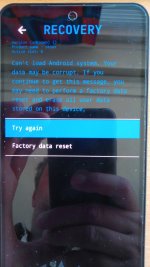
Auf Factory reset tippen
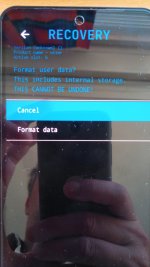
Format data/factory reset antippen
Mit einem Tippen auf Format data bestätigen
Nach Fertigstellung auf den Pfeil links oben tippen
Anschließend auf Reboot system now tippen und das Gerät startet sich neu
I have a shiftphone 8 with ShiftOS-L 7.1.
For professional reason I need to go back to ShiftOS G.
I have tried to install the ShiftOS 6.8 G with the file provided "OTTER. SOS.6.8.G-RELEASE-20260914-OTA.zip"
I have followed your instruction.
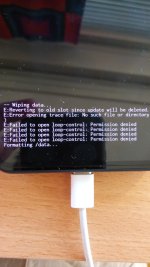
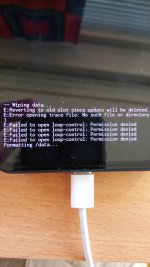
Downloading and installation worked good, then when doing the factory reset (before restarting as you warned) I have many error messages (see photo below), once restarted I see that the phone is still working with ShiftOS-L 7.1.
Any idea how to solve this issue ?
I would be very grateful
Many thanks
Vincent
I have filled up a support request : Ticket : SHIFT#554029135
I have a shiftphone 8 with ShiftOS-L 7.1.
For professional reason I need to go back to ShiftOS G.
I have tried to install the ShiftOS 6.8 G with the file provided "OTTER. SOS.6.8.G-RELEASE-20260914-OTA.zip"
I have followed your instruction.
Downloading and installation worked good, then when doing the factory reset (before restarting as you warned) I have many error messages (see photo below), once restarted I see that the phone is still working with ShiftOS-L 7.1.
Any idea how to solve this issue ?
I would be very grateful
Many thanks
Vincent
I have filled up a support request : Ticket : SHIFT#554029135
I did it like 10 times yesterday, either way same trouble. first factory reset and second restart, or first restart and second factory reset, same result, the failed message during factory reset and the phone still working with shfitOS L 7.1. I can try it again now, just give me a few minutes to do it.
I did it like 10 times yesterday, either way same trouble. first factory reset and second restart, or first restart and second factory reset, same result, the failed message during factory reset and the phone still working with shfitOS L 7.1. I can try it again now, just give me a few minutes to do it.
Ok I did it again, this time I've restarted when asked after installation is completed. The phone restarts, then shows the same message : "cant load Android system ... need factory reset". So I accepted the factory reset, and it shows the same message at bottom of screen
E: error opening trace file : no such file or directory
E: failed to open loop-control: Permission denied
Hello,
no success Yesterday trying factory reset both before and after restarting.
Same error failed to open loop control permission denied.
In your post you wrote that a Fastboot is an alternative option.
I don't trust my knowledge and skill to perform a Fastboot.
And since you warned that in case the phone does not reboot (bootloader locked) it need to be sent back to shift office for repair, I will not try a Fastboot.
So my only solution is the ShiftOS 6.8 G update to work.
(I have also try to install previous G update, the 6.7, 6.6, 6.5, but the files wont even load for installation)
Do you think there is any chance to have a answer and a solution in the coming days ?
(not weeks please :-((
Many thanks for your support
Vincent
As far as I understood, it is not possible to use the "...-OTA.zip" to install an "older" version of the Shift OS. Since OS-G (Android 14) is always "older" than OS-L (Android 15), there is no way to install OS-G from OS-L by using the OTA (for now). You are obliged to use Fastboot with OTTER.SOS.6.8.G-RELEASE-20260914-FASTBOOT.tar.gz.
I'm not quite sure, what steps exactly you performed for installing Shift OS-G from Shift OS-L.
You mentioned
As far as I understood, it is not possible to use the "...-OTA.zip" to install an "older" version of the Shift OS. Since OS-G (Android 14) is always "older" than OS-L (Android 15), there is no way to install OS-G from OS-L by using the OTA (for now). You are obliged to use Fastboot with OTTER.SOS.6.8.G-RELEASE-20260914-FASTBOOT.tar.gz.
From that I don't know how
for you.
To help solving your issue, it might be helpful if you clarify your steps and used files in more detail.
Dear Gernot
Thanks for your message.
I have download the file proposed at the beginning to this thread by Amartinz, the "OTTER.....OTTA.zip" file.
then click install the update form the "local update" option.
then installation worked fine.
The "OTTER.....OTTA.zip" file is found by the system, imported and installed
it is when asked for restart/reboot, and factory reset that it went wrong .
What you worte :
""As far as I understood, it is not possible to use the "...-OTA.zip" to install an "older" version of the Shift OS. Since OS-G (Android 14) is always "older" than OS-L (Android 15), there is no way to install OS-G from OS-L by using the OTA (for now). You are obliged to use Fastboot""
is exactly what I am afraid of :
impossible to us the OTA.zip, oblige to use Fastboot.
I am not a super geek expert myself, and I am afraid that if I mess up something I will have to send back my shiftphone 8 to Shift office / workshop in Germany. For them to perform a total reboot, as Amartinz warned at the beginning of the thread you share (which I read already and trigger my concern about performing a Fastboot on my own ):
(https://forum.shiftphones.com/threa...derherstellung-mittels-fastboot-paketen.5824/)
If I failed to perform the Fastboot then I have to send the phone back to Germany . Which I would like to avoid
Dear Gernot
Thanks for your message.
I have download the file proposed at the beginning to this thread by Amartinz, the "OTTER.....OTTA.zip" file.
then click install the update form the "local update" option.
""As far as I understood, it is not possible to use the "...-OTA.zip" to install an "older" version of the Shift OS. Since OS-G (Android 14) is always "older" than OS-L (Android 15), there is no way to install OS-G from OS-L by using the OTA (for now). You are obliged to use Fastboot""
is exactly what I am afraid of :
impossible to us the OTA.zip, oblige to use Fastboot.
I am not a super geek expert myself, and I am afraid that if I mess up something I will have to send back my shiftphone 8 to Shift office / workshop in Germany. For them to perform a total reboot, as Amartinz warned at the beginning of the thread you share (which I read already and trigger my concern about performing a Fastboot on my own ):
(https://forum.shiftphones.com/threa...derherstellung-mittels-fastboot-paketen.5824/)
If I failed to perform the Fastboot then I have to send the phone back to Germany . Which I would like to avoid
Diese Seite verwendet Cookies, um Inhalte zu personalisieren und dich nach einem Login angemeldet zu halten, wenn du registriert bist.
Durch die weitere Nutzung unserer Webseite erklärst du dich damit einverstanden.